Tree Frog Monogram: A Distinctive Serif Font for Web Design
In the crowded digital landscape, establishing a memorable visual identity requires more than just clean layouts and high-quality images. Typography plays a pivotal role in how users perceive brand authority, creativity, and trust. As web designers and UI specialists, we constantly search for typefaces that balance artistic flair with functional clarity. Tree Frog Monogram emerges as a compelling option in the realm of decorative fonts, offering a unique blend of classic serif structure and whimsical detail that can elevate digital experiences without sacrificing readability.
This premium display font is not merely a stylistic choice; it is a strategic design asset. By integrating detailed illustrative elements within bold capital letters, Tree Frog Monogram creates an immediate visual hook. For digital product creators, landing page designers, and online store owners, understanding how to deploy such a distinctive typeface effectively is key to enhancing user engagement and conversion rates.
Visual Characteristics and Digital Appeal
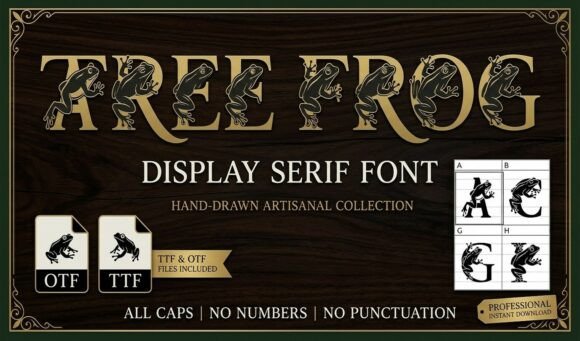
Tree Frog Monogram stands out due to its hybrid nature. It features classic, bold serif capital letters that provide a solid structural foundation, ensuring that each character remains legible even at larger sizes. However, the defining feature is the intricate integration of nature-inspired details within the letterforms. This combination results in a typeface that feels both grounded and playful, making it ideal for brands that wish to convey professionalism alongside creativity.
Unlike standard script fonts or handwritten fonts that can sometimes struggle with legibility on screens, this decorative font maintains strong vertical stems and clear counters. This makes it particularly suitable for hero sections, banners, and header graphics where immediate impact is necessary. The bold weight ensures that text remains visible against various backgrounds, from light minimalist interfaces to dark, immersive modes.
Strategic Applications in Web Layouts
When incorporating Tree Frog Monogram into web design, context is everything. Because it is a display font, it performs best when used sparingly to create focal points. Overusing it for body copy would disrupt reading flow and reduce accessibility. Instead, consider these high-impact applications:
- Hero Sections and Landing Pages: Use the font for main headlines to capture attention immediately. Its unique personality helps differentiate your value proposition from competitors using generic sans serif fonts.
- Brand Logos and Wordmarks: For boutique online stores or creative portfolios, Tree Frog Monogram can serve as the primary logo text, creating a cohesive brand identity across social media graphics and packaging design.
- Call-to-Action Areas: Short, punchy phrases in buttons or banner ads benefit from the font’s bold presence, encouraging clicks through visual distinctiveness.
- Section Headings: Break up long-form content on blog pages or course sales pages with subheadings styled in Tree Frog Monogram to maintain visual rhythm and guide scanning behavior.
For example, a coaching website might use this font for testimonial quotes or section dividers, adding a touch of warmth and personality that resonates with potential clients. Similarly, a digital brand kit for an eco-friendly product line could leverage the nature-themed details to reinforce brand values visually.
Readability and Responsive Design Considerations
While Tree Frog Monogram is visually striking, maintaining readability across devices is crucial for modern typography. On mobile screens, complex details can blur if the font size is too small. Therefore, it is essential to test the font at various breakpoints. Ensure that the minimum font size for headings using this typeface is large enough to preserve the integrity of the integrated details.
Contrast also plays a significant role. When placing Tree Frog Monogram over image overlays or textured backgrounds, verify that there is sufficient contrast between the text and the background. Using a solid color backdrop or a subtle drop shadow can enhance legibility without compromising the aesthetic. For dark mode interfaces, ensure the font renders clearly against dark backgrounds, possibly adjusting weight or spacing if necessary.
Effective Font Pairing Strategies
To maximize the effectiveness of Tree Frog Monogram, pair it with complementary typefaces that support rather than compete with its decorative nature. A clean, neutral sans serif font is often the best choice for body copy. This contrast creates a balanced visual hierarchy, allowing the display font to shine while ensuring that longer texts remain easy to read.
Alternatively, for a more editorial design feel, consider pairing it with a simple serif font for subheadings. This approach works well for lifestyle blogs or magazine-style websites where a sophisticated yet approachable tone is desired. Avoid pairing it with other highly decorative or script fonts, as this can create visual clutter and confuse the user’s eye.
Technical Implementation and Licensing
Before integrating Tree Frog Monogram into client projects or digital templates, review the technical specifications. Check for available file formats, including webfont options like WOFF and WOFF2, which ensure fast loading times and crisp rendering across browsers. Verify multilingual support if your target audience spans different regions, as this affects global usability.
Additionally, always adhere to commercial font licensing agreements. Whether you are designing for a SaaS founder, creating assets for an online store, or developing a personal portfolio, ensure that your license covers web usage, digital ads, and template distribution. Proper licensing protects your work and respects the intellectual property of the type designer.
By thoughtfully applying Tree Frog Monogram in your web design projects, you can create distinctive, engaging, and professional digital experiences. Its ability to merge classic serif elegance with creative detail makes it a versatile tool for enhancing brand identity and driving user interaction in today’s competitive online environment.